```
:::





Each version renders the four-node pipeline with 40 units between neighboring nodes and 90 units between ranks. `renderNow()` repaints immediately after the engine changes positions; `fitView(50)` frames the complete graph with padding.
## 2. Let Grafloria choose
Use `auto` when the graph shape matters more than a fixed algorithm. The JavaScript form is an omitted name; the component bindings accept the string value.
```js
async function fitAutomaticLayout(instance) {
await instance.getEngine().layout();
instance.renderNow();
instance.fitView(50);
}
```
An unknown layout name throws an error listing the registered names. Use a registered name when your interface lets the reader choose an algorithm.
## Options that matter
| option | type | default | what it does |
| --- | --- | --- | --- |
| `nodeSpacing` | `number` | algorithm-specific | Sets spacing between neighboring nodes. |
| `rankSpacing` | `number` | algorithm-specific | Sets spacing between ranks. |
| `seed` | `number` | fixed layout seed | Makes a layout with the same graph reproducible. |
| `nested` | `boolean` | enabled when the diagram has groups | Controls nested-container layout; set `false` to opt out. |
The same options object goes to `engine.layout(name, options)`. The engine returns a layout result after it commits positions; the result includes the selected algorithm, seed, node positions, and bounds.
## Pitfall: ports are hidden by default
Ports are hidden until hover. If the layout is part of a persistent editing surface and readers need to see connection points, set `portVisibility: 'always'` when creating the diagram or update the live engine:
```js
function showPorts(instance) {
instance.getEngine().setInteractionConfig({ portVisibility: 'always' });
}
```
## See it running
Open the [auto-layout demo](https://grafloria.com/demos/layout/auto-layout.html) to switch between algorithms on a graph whose nodes begin stacked at the origin. The demo also checks that the layout commits positions, avoids overlaps, and produces different pictures for different engines.
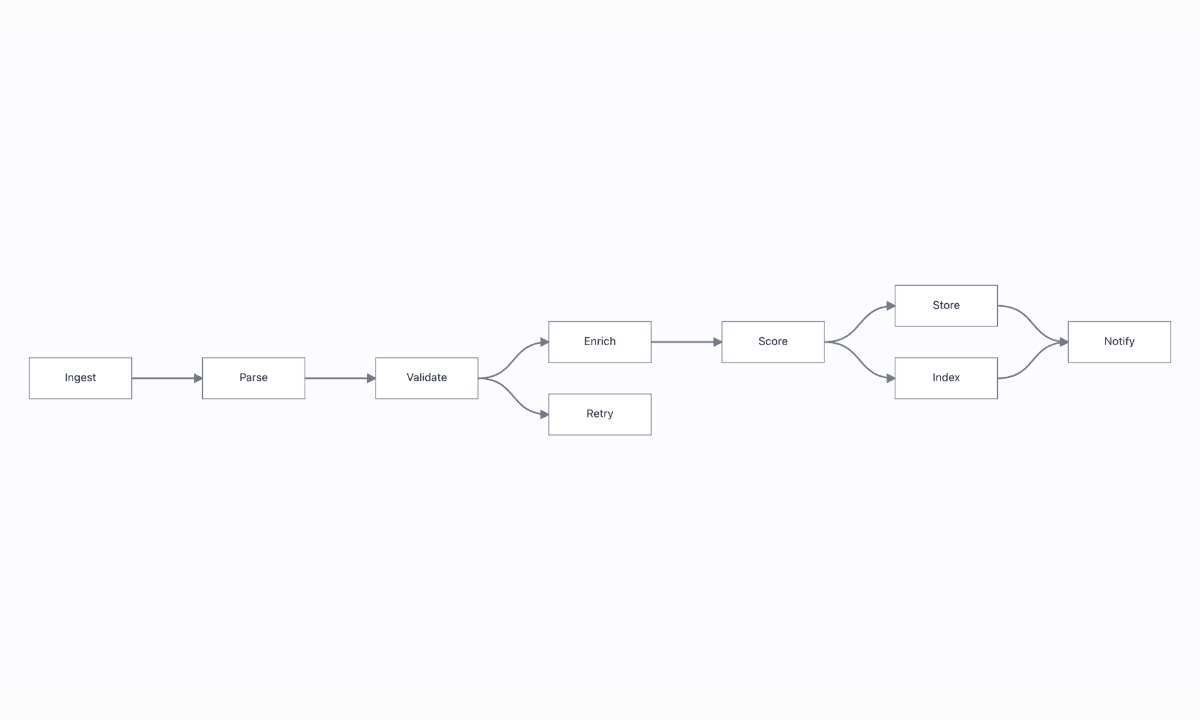
For a graph with disconnected components, see the [layout portfolio demo](https://grafloria.com/demos/layout/layout-portfolio.html). For incremental changes that preserve the user's mental map, see [layout and routing](https://atloria.dev/p/grafloria-h7YM7amryF/developer/layout-and-routing).
## Related
- [How Grafloria works](https://atloria.dev/p/grafloria-h7YM7amryF/developer/how-grafloria-works)
- [Style a diagram](https://atloria.dev/p/grafloria-h7YM7amryF/developer/style-a-diagram)
- [Create custom nodes](https://atloria.dev/p/grafloria-h7YM7amryF/developer/create-custom-nodes)
# @grafloria/react
React bindings for Grafloria Diagrams and Grafloria Dashboards — an MIT diagram and dashboard engine: routing, auto-layout, undo, collaboration and dashboard layouts, native in React.
## Install
```bash
npm install @grafloria/react @grafloria/engine @grafloria/renderer react react-dom @grafloria/element
```
It expects these alongside it:
- `@grafloria/engine` ^0.3.0
- `@grafloria/renderer` ^0.4.16
- `react` ^17.0.0 || ^18.0.0 || ^19.0.0
- `react-dom` ^17.0.0 || ^18.0.0 || ^19.0.0
- `@grafloria/element` ^0.4.3
## Functions
### `createGrafloriaStore`
```ts
function createGrafloriaStore(): GrafloriaStore
```
### `GrafloriaCommentPanel`
```ts
function GrafloriaCommentPanel(props: GrafloriaCommentPanelProps)
```
**Props**
| Name | Type | Default | Description |
| --- | --- | --- | --- |
| `store` | `CommentStore` | | |
| `options?` | `CommentPanelOptions` | | |
| `onSelect?` | `(threadId: string) => void` | | |
| `className?` | `string` | | |
| `style?` | `CSSProperties` | | |
**Events**
- `onSelect`
### `GrafloriaDashboard`
```ts
function GrafloriaDashboard(props: GrafloriaDashboardProps)
```
**Props**
| Name | Type | Default | Description |
| --- | --- | --- | --- |
| `views?` | `DashboardViewSpec[]` | | Multi-view (tabbed) board. Mutually exclusive with `widgets`. |
| `widgets?` | `DashboardWidgetSpec[]` | | Single-view shorthand. |
| `options?` | `Partial` | | Board options: columns, gap, sizing, rtl, responsive, binder… |
| `widgetTypes?` | `WidgetTypes` | | Maps a widget `kind` to the React component that renders it. |
| `activeView?` | `string` | | The visible view (the tab pattern). Omit for kit-managed. |
| `layout?` | `"split" \| "grid"` | | LIVE SWITCHES — the toolbar toggles as props. Each is applied at mount |
| `sizing?` | `"fit" \| "grow"` | | |
| `static?` | `boolean` | | Static board: the viewer's mode — no drag, no resize, no handles. |
| `onReady?` | `(handle: DashboardHandle) => void` | | The typed handle, once the board is live. |
| `onLayoutChange?` | `(change: { viewId: string; widgets: DashboardWidgetSpec[]; }) => void` | | Mirrors the kit's committed gestures (drag, resize, add, remove). |
| `className?` | `string` | | |
| `style?` | `CSSProperties` | | |
| `children?` | `ReactNode` | | |
**Events**
- `onReady` — The typed handle, once the board is live.
- `onLayoutChange` — Mirrors the kit's committed gestures (drag, resize, add, remove).
### `GrafloriaDiagram`
```ts
function GrafloriaDiagram(props: GrafloriaDiagramProps)
```
**Props**
| Name | Type | Default | Description |
| --- | --- | --- | --- |
| `spec` | `RenderSpec` | | Any kit spec — `erDiagram(...)`, `umlDiagram(...)`, `dashboard(...)`, or DSL text. |
| `options?` | `RenderOptions` | | Options passed through to the underlying `createDiagram`. |
| `onReady?` | `(instance: DiagramInstance) => void` | | |
| `className?` | `string` | | |
| `style?` | `CSSProperties` | | |
**Events**
- `onReady`
### `GrafloriaFlow`
```ts
function GrafloriaFlow(props: GrafloriaFlowProps)
```
**Props**
| Name | Type | Default | Description |
| --- | --- | --- | --- |
| `nodes?` | `NodeSpec[]` | | Controlled nodes. Provide with `onNodesChange` (see `useNodesState`). |
| `edges?` | `EdgeSpec[]` | | Controlled edges. |
| `groups?` | `(GroupModel \| GroupSpec)[]` | | Controlled groups — zones around some nodes (a spec's `groups`, or the live |
| `defaultNodes?` | `NodeSpec[]` | | Uncontrolled nodes — the instance owns them from here on. |
| `defaultEdges?` | `EdgeSpec[]` | | |
| `defaultGroups?` | `(GroupModel \| GroupSpec)[]` | | |
| `onNodesChange?` | `(nodes: NodeModel[]) => void` | | |
| `onEdgesChange?` | `(edges: LinkModel[]) => void` | | |
| `onSelectionChange?` | `(change: { nodes: NodeModel[]; edges: LinkModel[]; }) => void` | | |
| `onConnect?` | `(change: { link: LinkModel; }) => void` | | |
| `onNodeClick?` | `(change: { node: NodeModel; world: { x: number; y: number; }; }) => void` | | |
| `onEdgeClick?` | `(change: { edge: LinkModel; world: { x: number; y: number; }; }) => void` | | |
| `onInit?` | `(instance: DiagramInstance) => void` | | |
| `nodeTypes?` | `NodeTypes` | | Custom node components, keyed by node `type`. |
| `theme?` | `Theme` | | |
| `fitView?` | `boolean` | | |
| `enablePan?` | `boolean` | | |
| `enableZoom?` | `boolean` | | |
| `zoomSensitivity?` | `number` | | |
| `dragThreshold?` | `number` | | |
| `readonly?` | `boolean` | | |
| `minZoom?` | `number` | | |
| `maxZoom?` | `number` | | |
| `ssr?` | `{ html: string; snapshot: HydrationSnapshot; }` | | The `renderToStaticSVG()` result. Renders server-side, hydrates client-side. |
| `layout?` | `string \| { name: string; options?: Record; }` | | Declarative auto-layout — any engine registry name ('elk', 'dagre', |
| `onLayoutDone?` | `(result: unknown) => void` | | Fires after each declarative layout completes. |
| `plugins?` | `boolean \| CanvasPluginOptions` | | Canvas plugins — `true` mounts minimap + zoom/fit controls + background |
| `collab?` | `GrafloriaCollabOptions` | | Real-time collaboration: hand in a transport (BroadcastChannelTransport, |
| `onCollabReady?` | `(session: SyncAdapter) => void` | | The live SyncAdapter, right after `join()`. |
| `comments?` | `boolean \| CommentStore` | | Anchored comment threads — `true` creates a store, or pass a shared |
| `commentsViewer?` | `string` | | Viewer id for a `comments: true`-created store. |
| `rendererConfig?` | `Record` | | Renderer config passthrough (parallelLinks, parallelSpacing, jump styles, …). |
| `interaction?` | `Record` | | Interaction config passthrough (portVisibility, enableHelperLines, …). |
| `tokenBridge?` | `unknown` | | Design-token bridge — adopt the app's shadcn / MUI / Tailwind CSS variables. |
| `highlighterConfig?` | `boolean \| Partial` | | The outline layer Angular's canvas draws: outlines around the hovered node, |
| `highlightConnected?` | `boolean \| HighlightConnectedOptions` | | Bring the selected nodes' lines forward and fade the rest: `true`, or |
| `className?` | `string` | | |
| `style?` | `CSSProperties` | | |
| `children?` | `ReactNode` | | Overlays (toolbars, panels). Rendered as siblings of the canvas. |
**Events**
- `onNodesChange`
- `onEdgesChange`
- `onSelectionChange`
- `onConnect`
- `onNodeClick`
- `onEdgeClick`
- `onInit`
- `onLayoutDone` — Fires after each declarative layout completes.
- `onCollabReady` — The live SyncAdapter, right after `join()`.
### `GrafloriaProvider`
Wrap anything that needs `useGrafloria()` outside of ``'s subtree.
```tsx
// useGrafloria() works here…
// …because the flow publishes its instance to the store
```
`` also creates its own store when there is no provider, so the
simple single-canvas case needs no wrapper at all.
```ts
function GrafloriaProvider({ children }: GrafloriaProviderProps)
```
**Props**
| Name | Type | Default | Description |
| --- | --- | --- | --- |
| `children?` | `ReactNode` | | |
### `useEdgesState`
Controlled edge state. Mirrors {@link useNodesState}.
```ts
function useEdgesState(initial: EdgeSpec[] = []): EdgesState
```
### `useGrafloria`
The live `DiagramInstance`, or `null` until `` has mounted.
Works from anywhere inside an `` (a toolbar, a minimap, a
sidebar) and from inside ``'s own children.
```tsx
const grafloria = useGrafloria();
```
```ts
function useGrafloria(): DiagramInstance | null
```
### `useGrafloriaStore`
The nearest store, or null when there is no provider above us.
```ts
function useGrafloriaStore(): GrafloriaStore | null
```
### `useNodesState`
Controlled node state — the React Flow tuple everyone already knows:
```tsx
const [nodes, setNodes, onNodesChange] = useNodesState(initialNodes);
```
`onNodesChange` is what closes the loop: the user drags a node, the ENGINE
moves it, the instance emits `nodes:change`, `` calls this, and
React state catches up. Without it a controlled `` would snap the
node back on the next render — the classic controlled-component trap.
```ts
function useNodesState(initial: NodeSpec[] = []): NodesState
```
### `useOnSelectionChange`
Fire a callback whenever the selection changes.
```tsx
useOnSelectionChange(({ nodes }) => setInspected(nodes[0] ?? null));
```
The handler is held in a ref, so passing an inline arrow (the common case)
does NOT re-subscribe on every render.
```ts
function useOnSelectionChange(handler: (change: SelectionChange) => void): void
```
### `useSelection`
The current selection as state (for rendering an inspector panel).
```ts
function useSelection(): SelectionChange
```
### `useViewport`
The live camera (zoom + world rect) as state — for a minimap or a zoom badge.
```ts
function useViewport(): { zoom: number; x: number; y: number }
```
## Constants
### `GrafloriaContext`
```ts
const GrafloriaContext: any
```
## Interfaces
### `GrafloriaCommentPanelProps`
```ts
interface GrafloriaCommentPanelProps
```
**Properties**
| Name | Type | Default | Description |
| --- | --- | --- | --- |
| `store` | `CommentStore` | | |
| `options?` | `CommentPanelOptions` | | |
| `onSelect?` | `(threadId: string \| null) => void` | | |
| `className?` | `string` | | |
| `style?` | `CSSProperties` | | |
### `GrafloriaDashboardProps`
```ts
interface GrafloriaDashboardProps
```
**Properties**
| Name | Type | Default | Description |
| --- | --- | --- | --- |
| `views?` | `DashboardViewSpec[]` | | Multi-view (tabbed) board. Mutually exclusive with `widgets`. |
| `widgets?` | `DashboardWidgetSpec[]` | | Single-view shorthand. |
| `options?` | `Partial` | | Board options: columns, gap, sizing, rtl, responsive, binder… |
| `widgetTypes?` | `WidgetTypes` | | Maps a widget `kind` to the React component that renders it. |
| `activeView?` | `string` | | The visible view (the tab pattern). Omit for kit-managed. |
| `layout?` | `'grid' \| 'split'` | | LIVE SWITCHES — the toolbar toggles as props. Each is applied at mount (over `options`) and, when it changes afterwards, through the handle (`setLayout` / `setSizing` / `setStatic`) — no remount, like `activeView`. 'split' is the DevExpress splitter tree; 'grid' the cell grid. |
| `sizing?` | `'fit' \| 'grow'` | | |
| `static?` | `boolean` | | Static board: the viewer's mode — no drag, no resize, no handles. |
| `onReady?` | `(handle: DashboardHandle) => void` | | The typed handle, once the board is live. |
| `onLayoutChange?` | `(change: { viewId: string; widgets: DashboardWidgetSpec[] }) => void` | | Mirrors the kit's committed gestures (drag, resize, add, remove). |
| `className?` | `string` | | |
| `style?` | `CSSProperties` | | |
| `children?` | `ReactNode` | | |
### `GrafloriaDiagramProps`
```ts
interface GrafloriaDiagramProps
```
**Properties**
| Name | Type | Default | Description |
| --- | --- | --- | --- |
| `spec` | `RenderSpec` | | Any kit spec — `erDiagram(...)`, `umlDiagram(...)`, `dashboard(...)`, or DSL text. |
| `options?` | `RenderOptions` | | Options passed through to the underlying `createDiagram`. |
| `onReady?` | `(instance: DiagramInstance) => void` | | |
| `className?` | `string` | | |
| `style?` | `CSSProperties` | | |
### `GrafloriaFlowProps`
```ts
interface GrafloriaFlowProps
```
**Properties**
| Name | Type | Default | Description |
| --- | --- | --- | --- |
| `nodes?` | `NodeSpec[]` | | Controlled nodes. Provide with `onNodesChange` (see `useNodesState`). |
| `edges?` | `EdgeSpec[]` | | Controlled edges. |
| `groups?` | `Array` | | Controlled groups — zones around some nodes (a spec's `groups`, or the live GroupModels of a loaded document). Reconciled like `nodes`. |
| `defaultNodes?` | `NodeSpec[]` | | Uncontrolled nodes — the instance owns them from here on. |
| `defaultEdges?` | `EdgeSpec[]` | | |
| `defaultGroups?` | `Array` | | |
| `onNodesChange?` | `(nodes: NodeModel[]) => void` | | |
| `onEdgesChange?` | `(edges: LinkModel[]) => void` | | |
| `onSelectionChange?` | `(change: { nodes: NodeModel[]; edges: LinkModel[] }) => void` | | |
| `onConnect?` | `(change: { link: LinkModel }) => void` | | |
| `onNodeClick?` | `(change: { node: NodeModel; world: { x: number; y: number } }) => void` | | |
| `onEdgeClick?` | `(change: { edge: LinkModel; world: { x: number; y: number } }) => void` | | |
| `onInit?` | `(instance: DiagramInstance) => void` | | |
| `nodeTypes?` | `NodeTypes` | | Custom node components, keyed by node `type`. |
| `theme?` | `Theme` | | |
| `fitView?` | `boolean` | | |
| `enablePan?` | `boolean` | | |
| `enableZoom?` | `boolean` | | |
| `zoomSensitivity?` | `number` | | |
| `dragThreshold?` | `number` | | |
| `readonly?` | `boolean` | | |
| `minZoom?` | `number` | | |
| `maxZoom?` | `number` | | |
| `ssr?` | `{ html: string; snapshot: HydrationSnapshot }` | | The `renderToStaticSVG()` result. Renders server-side, hydrates client-side. |
| `layout?` | `string \| { name: string; options?: Record }` | | Declarative auto-layout — any engine registry name ('elk', 'dagre', 'force', 'tree', 'grid', 'auto', …) or `{ name, options }`. Re-runs when the prop VALUE changes, never when node data changes. |
| `onLayoutDone?` | `(result: unknown) => void` | | Fires after each declarative layout completes. |
| `plugins?` | `boolean \| CanvasPluginOptions` | | Canvas plugins — `true` mounts minimap + zoom/fit controls + background grid with defaults; an object picks and configures them. |
| `collab?` | `GrafloriaCollabOptions` | | Real-time collaboration: hand in a transport (BroadcastChannelTransport, WebSocketTransport, MemoryTransport, …) and an actor id — the flow joins a CRDT sync session at mount and leaves on unmount. Fixed for the life of the instance. |
| `onCollabReady?` | `(session: SyncAdapter) => void` | | The live SyncAdapter, right after `join()`. |
| `comments?` | `boolean \| CommentStore` | | Anchored comment threads — `true` creates a store, or pass a shared `CommentStore`. Read it back with `useGrafloria()?.getCommentStore()`. |
| `commentsViewer?` | `string` | | Viewer id for a `comments: true`-created store. |
| `rendererConfig?` | `Record` | | Renderer config passthrough (parallelLinks, parallelSpacing, jump styles, …). |
| `interaction?` | `Record` | | Interaction config passthrough (portVisibility, enableHelperLines, …). |
| `tokenBridge?` | `unknown` | | Design-token bridge — adopt the app's shadcn / MUI / Tailwind CSS variables. |
| `highlighterConfig?` | `boolean \| Partial` | | The outline layer Angular's canvas draws: outlines around the hovered node, the selected node, nodes with a validation issue, and valid connection targets. `true` turns every kind on; an object turns kinds on or off one by one. Off when unset. Live: follows the prop by value. |
| `highlightConnected?` | `boolean \| HighlightConnectedOptions` | | Bring the selected nodes' lines forward and fade the rest: `true`, or options (depth, stroke, outgoing, dimOpacity). Off when unset. Live: follows the prop by value. |
| `className?` | `string` | | |
| `style?` | `CSSProperties` | | |
| `children?` | `ReactNode` | | Overlays (toolbars, panels). Rendered as siblings of the canvas. |
### `GrafloriaProviderProps`
```ts
interface GrafloriaProviderProps
```
**Properties**
| Name | Type | Default | Description |
| --- | --- | --- | --- |
| `children?` | `ReactNode` | | |
### `GrafloriaStore`
The provider + the store behind `useGrafloria()`.
React Flow's ergonomics come from exactly this shape: a ``
that lets a toolbar, a sidebar or a minimap — components that are SIBLINGS of
the canvas, not children of it — reach the live instance. We keep that shape,
but the thing being shared is our framework-agnostic `DiagramInstance`, so the
provider is a 40-line store and NOT a re-implementation of the diagram.
Why a hand-rolled store rather than `useSyncExternalStore`: that hook is React
18+, and this package supports React 17–19. Subscribe + `useState` costs one
extra render on attach and works everywhere.
```ts
interface GrafloriaStore
```
**Members**
- `get(): DiagramInstance | null` — The live instance, or null before `` has mounted.
- `set(instance: DiagramInstance | null): void` — Called by `` on mount/unmount.
- `subscribe(listener: (instance: DiagramInstance | null) => void): () => void` — Notified whenever the instance is attached or detached.
### `NodeProps`
Props a custom node component receives. Deliberately React-Flow-shaped.
```ts
interface NodeProps>
```
**Properties**
| Name | Type | Default | Description |
| --- | --- | --- | --- |
| `id` | `string` | | |
| `data` | `TData` | | |
| `selected` | `boolean` | | |
| `node` | `NodeModel` | | The live engine model — the escape hatch. |
### `SelectionChange`
```ts
interface SelectionChange
```
**Properties**
| Name | Type | Default | Description |
| --- | --- | --- | --- |
| `nodes` | `NodeModel[]` | | |
| `edges` | `LinkModel[]` | | |
### `WidgetProps`
Props a widget component receives — the `NodeProps` twin for boards.
```ts
interface WidgetProps>
```
**Properties**
| Name | Type | Default | Description |
| --- | --- | --- | --- |
| `widget` | `DashboardWidgetSpec` | | |
| `data` | `TData` | | |
## Types
### `EdgesState`
Also has every member of `Array`, listed on its own entry.
```ts
type EdgesState = [
EdgeSpec[],
Dispatch>,
(edges: LinkModel[]) => void,
];
```
### `NodesState`
Also has every member of `Array`, listed on its own entry.
What `useNodesState` hands back — React Flow's tuple, with our types.
```ts
type NodesState = [
NodeSpec[],
Dispatch>,
(nodes: NodeModel[]) => void,
];
```
### `NodeTypes`
`nodeTypes` maps a node's `type` to the component that renders it.
```ts
type NodeTypes = Record>>;
```
### `WidgetTypes`
```ts
type WidgetTypes = Record>;
```
## Also exported from here
These names are documented with the package that defines them, and can be imported from this one too.
- From [@grafloria/renderer](https://atloria.dev/p/grafloria-h7YM7amryF/developer/grafloria-renderer-overview): `DARK_THEME`, `DiagramInstance`, `EdgeSpec`, `HydrationSnapshot`, `LIGHT_THEME`, `NodeSpec`, `PortSpec`, `renderToStaticSVG`, `StaticRenderOptions`, `StaticRenderResult`, `Theme`
# How Grafloria works
Grafloria puts one headless engine underneath its JavaScript, React, Vue, Angular, and Qwik
surfaces. The engine owns behavior—commands, history, layout, validation, and collaboration—while
the model owns the diagram data.
```mermaid
flowchart TD
B["Framework binding"] --> I["DiagramInstance"]
I --> M["DiagramModel\nnodes, links, groups, viewport"]
I --> E["DiagramEngine\ncommands, layout, validation, history"]
M --> R["Renderer\npositions, routes, SVG"]
E --> R
```
## Start at the binding
Use the binding's canvas component when your application already uses a framework. The component
mounts a real diagram; its `nodes` and `edges` describe the initial or controlled graph, and its
instance callback gives you the shared handle.
### React
```tsx
import { GrafloriaFlow } from '@grafloria/react';
const nodes = [
{ id: 'a', position: { x: 60, y: 80 }, size: { width: 180, height: 80 }, data: { label: 'Ingest' } },
{ id: 'b', position: { x: 380, y: 80 }, size: { width: 180, height: 80 }, data: { label: 'Publish' } },
];
const edges = [{ id: 'e1', source: 'a', target: 'b' }];
export default function App() {
return (
instance.fitView()}
/>
);
}
```
The mounted canvas shows two connected nodes. `plugins` adds the minimap, zoom and fit controls,
and background grid. The `onInit` callback receives the live instance after mounting.
### Vue
```vue
```
Vue renders the same connected diagram. Use `v-model:nodes` and `v-model:edges` when the Vue
application owns the live arrays; use the `default-*` props when the canvas owns them after mount.
### Angular
```ts
import { Component } from '@angular/core';
import { DiagramCanvasComponent } from '@grafloria/angular';
@Component({
selector: 'app-root',
imports: [DiagramCanvasComponent],
template: `
`,
})
export class AppComponent {
nodes = [
{ id: 'a', position: { x: 60, y: 80 }, size: { width: 180, height: 80 }, data: { label: 'Ingest' } },
{ id: 'b', position: { x: 380, y: 80 }, size: { width: 180, height: 80 }, data: { label: 'Publish' } },
];
edges = [{ id: 'e1', source: 'a', target: 'b' }];
}
```
[`DiagramCanvasComponent`](https://atloria.dev/p/grafloria-h7YM7amryF/developer/grafloria-angular-components-diagramcanvascomponent#diagramcanvascomponent)
uses Angular's two-way `nodes` and `edges` binding here. A drag changes the live model and writes
the next arrays back through those bindings.
### Qwik
```tsx
import { component$, $ } from '@builder.io/qwik';
import { GrafloriaFlow, type DiagramInstance } from '@grafloria/qwik';
const nodes = [
{ id: 'a', position: { x: 60, y: 80 }, size: { width: 180, height: 80 }, data: { label: 'Ingest' } },
{ id: 'b', position: { x: 380, y: 80 }, size: { width: 180, height: 80 }, data: { label: 'Publish' } },
];
const edges = [{ id: 'e1', source: 'a', target: 'b' }];
export default component$(() => (
instance.fitView())}
/>
));
```
Qwik uses a QRL callback, but the callback receives the same instance and the canvas shows the same
graph. The binding is a thin surface over the shared engine rather than a separate graph engine.
## The model is the document
The model is the single source of truth. A [`DiagramModel`](https://atloria.dev/p/grafloria-h7YM7amryF/developer/grafloria-engine-models-diagrammodel#diagrammodel)
contains nodes, links, groups, and viewport data. A node is a [`NodeModel`](https://atloria.dev/p/grafloria-h7YM7amryF/developer/grafloria-engine-models-nodemodel#nodemodel);
an input edge uses [`EdgeSpec`](https://atloria.dev/p/grafloria-h7YM7amryF/developer/grafloria-renderer-instance-edgespec#edgespec). A
[`GroupSpec`](https://atloria.dev/p/grafloria-h7YM7amryF/developer/grafloria-renderer-instance#groupspec) describes a zone around child nodes.
Bindings turn plain specs into live models and reconcile later changes by id. Existing ids keep
their live objects, new ids create objects, and missing ids are removed. This lets selection,
listeners, and renderer state survive ordinary updates. The same document can be persisted,
snapshotted, exported, or shared.
For data queries, use `instance.getModel()`. For example, the model gives you `getNodes()`,
`getLinks()`, and `getGroups()` without reaching into the renderer.
## The instance is the shared handle
Plain JavaScript uses [`render`](https://atloria.dev/p/grafloria-h7YM7amryF/developer/grafloria-element-core#render) to mount a data spec and return
the live [`DiagramInstance`](https://atloria.dev/p/grafloria-h7YM7amryF/developer/grafloria-renderer-instance-diagraminstance#diagraminstance):
```ts
import { render } from '@grafloria/element';
const host = document.getElementById('canvas');
if (!host) throw new Error('Missing #canvas');
host.style.height = '400px';
const instance = render({
nodes: [
{ id: 'a', position: { x: 60, y: 80 }, size: { width: 180, height: 80 }, data: { label: 'Ingest' } },
{ id: 'b', position: { x: 380, y: 80 }, size: { width: 180, height: 80 }, data: { label: 'Publish' } },
],
edges: [{ id: 'e1', source: 'a', target: 'b' }],
}, host);
instance.fitView();
instance.on('selection:change', ({ nodes }) => console.log(nodes));
```
Use the instance for specs, painting, events, camera, export, and text round-trips.
`setNodes()` and `setEdges()` reconcile data; `render()` queues a coalesced repaint and
`renderNow()` repaints synchronously; `fitView()` frames all content. Dispose the instance from
your application's unmount or close handler, not immediately after mounting.
## Geometry comes from layout and routing
Nodes, ports, links, groups, directions, and constraints express semantic intent. Rendering and
layout determine positions and paths. Use the [`DiagramEngine`](https://atloria.dev/p/grafloria-h7YM7amryF/developer/grafloria-engine-engine#diagramengine)
for behavior below the instance:
```ts
import type { DiagramInstance } from '@grafloria/renderer';
async function arrange(instance: DiagramInstance): Promise {
await instance.getEngine().layout('elk');
instance.renderNow();
}
```
This lays out the already-mounted diagram and then paints the resulting geometry. Changing node
data does not re-run a declarative `layout` prop; call the engine's layout method explicitly and
repaint when you drive the instance yourself.
## Commands, history, and events
User gestures become commands on one history. Dragging, connecting, deleting, and grouping
therefore share undo and redo without application wiring. In React, Vue, and Qwik, reach the
engine through the instance; Angular's canvas also exposes its corresponding component methods.
```ts
import type { DiagramInstance } from '@grafloria/renderer';
async function undoAndRedo(instance: DiagramInstance): Promise {
await instance.getEngine().undo();
await instance.getEngine().redo();
}
```
The instance event map is the common event surface. `on()` returns an unsubscribe function, and
the framework bindings surface the same changes as React callbacks, Vue emits, Angular outputs,
or Qwik QRL callbacks. Use the component event first when the binding provides it; use
`instance.on()` for events that belong to the shared instance.
## Appearance and extension points
The renderer ships [`LIGHT_THEME`](https://atloria.dev/p/grafloria-h7YM7amryF/developer/grafloria-renderer-themes-constants#light_theme) and
[`DARK_THEME`](https://atloria.dev/p/grafloria-h7YM7amryF/developer/grafloria-renderer-themes-constants#dark_theme). Pass a theme to the component
or call `instance.setTheme()` to change the mounted diagram's appearance. The renderer also ships
[`registerTool`](https://atloria.dev/p/grafloria-h7YM7amryF/developer/grafloria-renderer-ext-functions#registertool) for canvas tools; it returns a
disposer that restores the previous tool with the same id.
Use the shipped layout adapters, themes, commands, and validators before writing replacements.
The [live demo gallery](https://grafloria.com/demos) shows the same mounted surfaces in operation.
## Next steps
- [Model and document](https://atloria.dev/p/grafloria-h7YM7amryF/developer/model-and-document) for serialization and persistence.
- [Instance and bindings](https://atloria.dev/p/grafloria-h7YM7amryF/developer/instance-and-bindings) for controlled state.
- [Layout and routing](https://atloria.dev/p/grafloria-h7YM7amryF/developer/layout-and-routing) for geometry.
- [Commands, events, and undo](https://atloria.dev/p/grafloria-h7YM7amryF/developer/commands-events-and-undo) for history and event details.
# JavaScript quick start
Mount an editable diagram in plain JavaScript, give its host and nodes a size, and keep the live instance for later updates.
Grafloria uses one headless engine beneath its framework bindings. In JavaScript, [`render`](https://atloria.dev/p/grafloria-h7YM7amryF/developer/grafloria-element-core) mounts data into an element and returns a [`DiagramInstance`](https://atloria.dev/p/grafloria-h7YM7amryF/developer/grafloria-renderer-instance-diagraminstance) that you use for updates, events, and camera operations.
## Prerequisites
Use a browser-based JavaScript project with Node.js and npm. Install the published packages:
```bash
npm install @grafloria/element @grafloria/renderer @grafloria/engine
```
## 1. Create a sized host
Give the host a resolved height. Give each node a `size` with its width and height; `position` places it in the diagram.
```html
```
The host is now large enough for the renderer to paint; the JavaScript sample gives each box explicit dimensions.
## 2. Render real data
Put nodes and edges in the render specification. The specification is data, not a Mermaid-style text string. Each edge refers to its source and target node by ID.
```js title="main.js"
import { render } from '@grafloria/element';
const canvas = document.getElementById('canvas');
if (!(canvas instanceof HTMLElement)) {
throw new Error('The #canvas host is missing');
}
canvas.style.height = '480px';
const nodes = [
{
id: 'ingest',
position: { x: 60, y: 80 },
size: { width: 180, height: 80 },
data: { label: 'Ingest' },
},
{
id: 'publish',
position: { x: 380, y: 80 },
size: { width: 180, height: 80 },
data: { label: 'Publish' },
},
];
const edges = [
{ id: 'ingest-to-publish', source: 'ingest', target: 'publish' },
];
const api = render(
{ nodes, edges },
canvas,
);
api.fitView(40);
window.addEventListener('pagehide', () => api.dispose(), { once: true });
```
The mounted canvas shows two editable boxes, `Ingest` and `Publish`, joined by an edge. You can drag nodes, draw connections, pan, zoom, and use Cmd/Ctrl+Z to undo. `fitView(40)` frames the content with 40 pixels of padding.
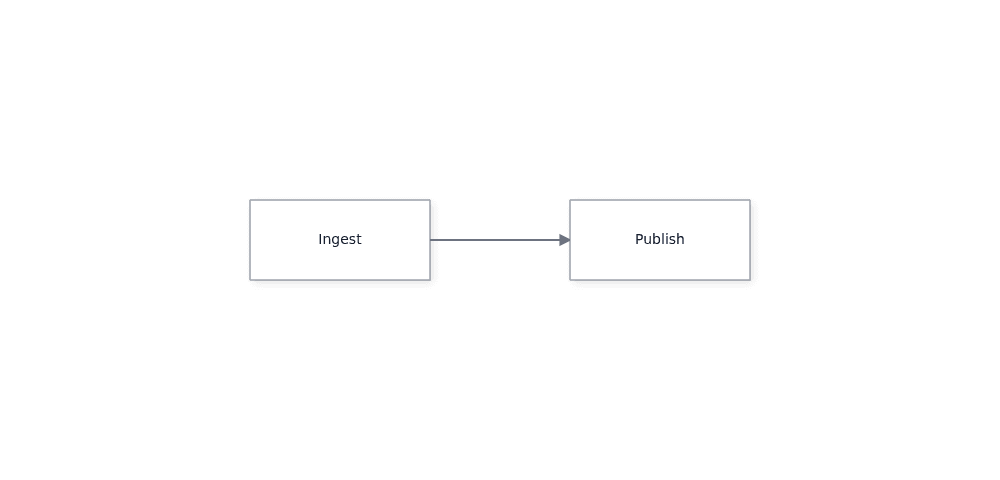
The `api` variable is the live [`DiagramInstance`](https://atloria.dev/p/grafloria-h7YM7amryF/developer/grafloria-renderer-instance-diagraminstance), not a copy of the input data. Subscribe to an instance event and update the mounted data through the instance methods:
```js title="main.js"
import { render } from '@grafloria/element';
const nodes = [
{ id: 'ingest', position: { x: 60, y: 80 }, size: { width: 180, height: 80 }, data: { label: 'Ingest' } },
{ id: 'publish', position: { x: 380, y: 80 }, size: { width: 180, height: 80 }, data: { label: 'Publish' } },
];
const edges = [{ id: 'ingest-to-publish', source: 'ingest', target: 'publish' }];
const canvas = document.getElementById('canvas');
if (!(canvas instanceof HTMLElement)) {
throw new Error('The #canvas host is missing');
}
canvas.style.height = '480px';
const api = render({ nodes, edges }, canvas);
const unsubscribe = api.on('nodes:change', ({ nodes: changedNodes }) => {
console.log('nodes in the live model:', changedNodes.length);
});
const nextNodes = [
...nodes,
{ id: 'archive', position: { x: 700, y: 80 }, size: { width: 180, height: 80 }, data: { label: 'Archive' } },
];
const nextEdges = [
...edges,
{ id: 'publish-to-archive', source: 'publish', target: 'archive' },
];
api.setEdges([]);
api.setNodes([]);
api.setNodes(nextNodes);
api.setEdges(nextEdges);
api.fitView(40);
window.addEventListener('pagehide', () => {
unsubscribe();
api.dispose();
}, { once: true });
```
The canvas now contains a third box and a second edge. The listener receives the live node-change payload; calling the returned function removes that listener.
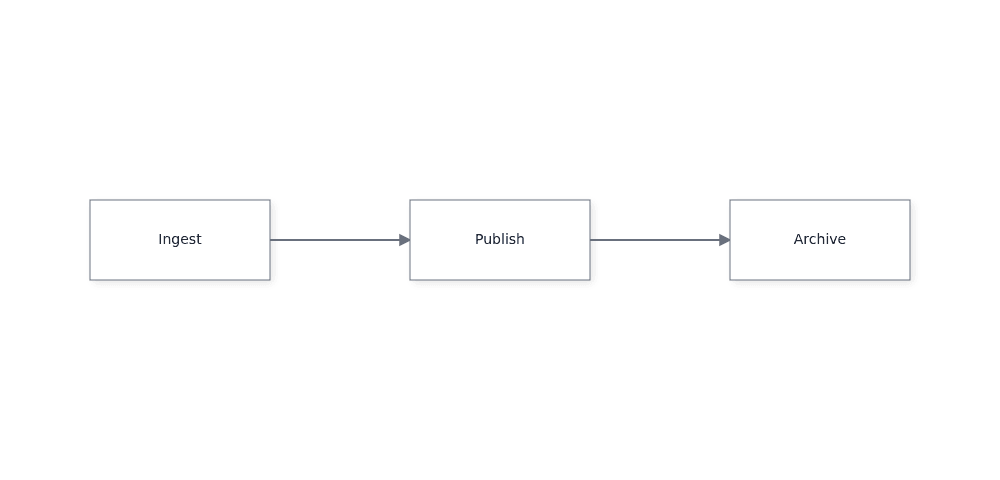
When replacing edited data that reuses persistent IDs, clear the existing edges and nodes before applying the replacement. Reconciliation preserves existing live models, so applying replacement arrays alone can retain stale models.
## 3. Clean up with the page lifecycle
Dispose the instance when the host leaves the page. Do not dispose it immediately after mounting: disposal removes the live diagram. The first sample registers this cleanup with `pagehide`.
## Use the custom element instead
[`GrafloriaFlowElement`](https://atloria.dev/p/grafloria-h7YM7amryF/developer/grafloria-element-core) is the web-component form of the same editor. Import the package once, put JSON data in its `nodes` and `edges` attributes, and give the element a height.
```html title="index.html"
```
This version shows the same editable two-node diagram without a framework component. Its `grafloria-connect` listener receives the connected link.
## What you have at the end
You have an editable, sized diagram backed by plain node and edge data, plus a live instance for fitting the view, listening for changes, replacing data, and disposing the renderer. The repository's [JavaScript starter](https://github.com/grafloria/grafloria/blob/ef2bcc55237d4d1f1643b6fea68bd996aa37a9e9/starters/javascript) uses the same mounting shape. Try it at the [JavaScript live demo](https://grafloria.com/javascript/).
For layout, themes, and other engine behavior, continue to [How Grafloria works](https://atloria.dev/p/grafloria-h7YM7amryF/developer/how-grafloria-works).
# @grafloria/renderer
SVG renderer for the Grafloria diagram engine — interaction, theming, accessibility, and SVG/PNG/PDF vector export
## Install
```bash
npm install @grafloria/renderer @grafloria/engine
```
It expects these alongside it:
- `@grafloria/engine` ^0.3.18
## What it exports
- [Core](https://atloria.dev/p/grafloria-h7YM7amryF/developer/grafloria-renderer-core): 17 exports, including `cancelFrame`, `CanvasRect`, `getDocument`, `hasDocument`
- [A11y](https://atloria.dev/p/grafloria-h7YM7amryF/developer/grafloria-renderer-a11y): 51 exports, including `Adjacency`, `analyseTopology`, `boundsOfPoints`, `buildAdjacency`
- [Canvas](https://atloria.dev/p/grafloria-h7YM7amryF/developer/grafloria-renderer-canvas): 79 exports, including `ALWAYS_SAFE_MODE`, `applyMatrix`, `arcToCubics`, `BackendMode`
- [Comments](https://atloria.dev/p/grafloria-h7YM7amryF/developer/grafloria-renderer-comments): 9 exports, including `CommentOverlayController`, `CommentOverlayOptions`, `CommentPanelOptions`, `CommentPanelView`
- [Export](https://atloria.dev/p/grafloria-h7YM7amryF/developer/grafloria-renderer-export): 106 exports, including `Artifact`, `AssetFetcher`, `AVG_CHAR_WIDTH_EM`, `base64ToBytes`
- [Ext](https://atloria.dev/p/grafloria-h7YM7amryF/developer/grafloria-renderer-ext): 115 exports, including `activeRegistryScope`, `AnchorContext`, `AnchorFn`, `AnchorResult`
- [Ext — Components](https://atloria.dev/p/grafloria-h7YM7amryF/developer/grafloria-renderer-ext-components): 15 exports, including `attachCanvasPlugins`, `BACKGROUND_LAYER_CLASS`, `BackgroundHandle`, `BackgroundOptions`
- [Instance](https://atloria.dev/p/grafloria-h7YM7amryF/developer/grafloria-renderer-instance): 49 exports, including `applyEdges`, `applyEdgeSpec`, `applyGroups`, `applyNodes`
- [Interaction](https://atloria.dev/p/grafloria-h7YM7amryF/developer/grafloria-renderer-interaction): 85 exports, including `AddWaypointResult`, `AlignmentGuide`, `angleAt`, `Announcement`
- [Lazy](https://atloria.dev/p/grafloria-h7YM7amryF/developer/grafloria-renderer-lazy): 13 exports, including `DeferredQuery`, `EntityKind`, `FreezeQuery`, `HostCullMode`
- [Perf](https://atloria.dev/p/grafloria-h7YM7amryF/developer/grafloria-renderer-perf): 8 exports, including `EMPTY_SNAPSHOT`, `formatSnapshot`, `GovernorOptions`, `GovernorState`
- [Presence](https://atloria.dev/p/grafloria-h7YM7amryF/developer/grafloria-renderer-presence): 12 exports, including `actorColor`, `actorInitials`, `bindPresence`, `BindPresenceOptions`
- [Presentation](https://atloria.dev/p/grafloria-h7YM7amryF/developer/grafloria-renderer-presentation): 11 exports, including `FollowOptions`, `followPresenter`, `InMemoryViewportChannel`, `isDocumentLocked`
- [Services](https://atloria.dev/p/grafloria-h7YM7amryF/developer/grafloria-renderer-services): 25 exports, including `AnimationConfig`, `AnimationEventData`, `AnimationLifecycleEvent`, `AnimationLifecycleManager`
- [Svg](https://atloria.dev/p/grafloria-h7YM7amryF/developer/grafloria-renderer-svg): 198 exports, including `applySpread`, `ArrowRenderer`, `assignSpreadLanes`, `autoSizeDiagram`
- [Themes](https://atloria.dev/p/grafloria-h7YM7amryF/developer/grafloria-renderer-themes): 83 exports, including `assertThemeContrast`, `auditThemeContrast`, `BASE_STYLE_RULES`, `BRIDGEABLE_TOKENS`
- [Types](https://atloria.dev/p/grafloria-h7YM7amryF/developer/grafloria-renderer-types): 50 exports, including `BooleanPropertyDefinition`, `BoundingBox`, `CanvasRendererConfig`, `ColorPalette`
- [Utils](https://atloria.dev/p/grafloria-h7YM7amryF/developer/grafloria-renderer-utils): 37 exports, including `AnimationColorSchemes`, `AnimationDescriptor`, `AnimationPresets`, `AnimationPriority`
- [Vnode](https://atloria.dev/p/grafloria-h7YM7amryF/developer/grafloria-renderer-vnode): 17 exports, including `camelToKebab`, `ContainerIdGenerator`, `createDomElement`, `createForeignObject`
## Also exported from here
These names are documented with the package that defines them, and can be imported from this one too.
- From [@grafloria/engine](https://atloria.dev/p/grafloria-h7YM7amryF/developer/grafloria-engine-overview): `NodeModel`, `PortLayoutArgs`, `PortLayoutSpec`, `PortModel`
# @grafloria/angular
Angular components for Grafloria Diagrams and Grafloria Dashboards — an MIT diagram and dashboard engine: routing, auto-layout, undo, collaboration and dashboard layouts, native in Angular.
## Install
```bash
npm install @grafloria/angular @angular/common @angular/core @angular/forms @angular/platform-browser @grafloria/engine @grafloria/renderer rxjs @grafloria/element
```
It expects these alongside it:
- `@angular/common` ^18.1.0 || ^19.0.0 || ^20.0.0 || ^21.0.0 || ^22.0.0
- `@angular/core` ^18.1.0 || ^19.0.0 || ^20.0.0 || ^21.0.0 || ^22.0.0
- `@angular/forms` ^18.1.0 || ^19.0.0 || ^20.0.0 || ^21.0.0 || ^22.0.0
- `@angular/platform-browser` ^18.1.0 || ^19.0.0 || ^20.0.0 || ^21.0.0 || ^22.0.0
- `@grafloria/engine` ^0.3.18
- `@grafloria/renderer` ^0.4.0
- `rxjs` ^7.8.0
- `@grafloria/element` ^0.4.3
## What it exports
- [Core](https://atloria.dev/p/grafloria-h7YM7amryF/developer/grafloria-angular-core): 9 exports, including `AngularComponentAdapter`, `GRAFLORIA_CONFIG`, `GrafloriaConfig`, `GrafloriaHandleDirective`
- [Components](https://atloria.dev/p/grafloria-h7YM7amryF/developer/grafloria-angular-components): 67 exports, including `AnimationPreset`, `AutoToolbarDirective`, `clamp01`, `ClosestHit`
- [Interaction](https://atloria.dev/p/grafloria-h7YM7amryF/developer/grafloria-angular-interaction): 17 exports, including `buildMarqueeRect`, `directionToIntersectionMode`, `HitKind`, `HitTestResult`
- [Services](https://atloria.dev/p/grafloria-h7YM7amryF/developer/grafloria-angular-services): 37 exports, including `AngularAnimationService`, `AnimationCallback`, `AnimationConfig`, `AnimationStats`
## Also exported from here
These names are documented with the package that defines them, and can be imported from this one too.
- From [@grafloria/renderer](https://atloria.dev/p/grafloria-h7YM7amryF/developer/grafloria-renderer-overview): `LinkPartHit`
# @grafloria/engine
Headless diagram engine — graph model, commands and undo, layout engines (ELK, dagre, force, tree), Mermaid-compatible text format, collaboration op-log
## Install
```bash
npm install @grafloria/engine
```
## What it exports
- [Core](https://atloria.dev/p/grafloria-h7YM7amryF/developer/grafloria-engine-core): 45 exports, including `ArchitectureGrid`, `ArchitectureLayoutOptions`, `ArchitectureLayoutResult`, `BulkSelectionOptions`
- [Collab](https://atloria.dev/p/grafloria-h7YM7amryF/developer/grafloria-engine-collab): 25 exports, including `ActorId`, `AddOp`, `applyEntitySet`, `applyOp`
- [Commands](https://atloria.dev/p/grafloria-h7YM7amryF/developer/grafloria-engine-commands): 64 exports, including `AddGroupCommand`, `AddLinkCommand`, `AddNodeCommand`, `AddPortCommand`
- [Comments](https://atloria.dev/p/grafloria-h7YM7amryF/developer/grafloria-engine-comments): 22 exports, including `AnchorSpec`, `CommentAnchor`, `CommentMessage`, `CommentRegisterTree`
- [Config](https://atloria.dev/p/grafloria-h7YM7amryF/developer/grafloria-engine-config): 10 exports, including `ConnectionLineStyle`, `ControlPointEditorConfig`, `DEFAULT_INTERACTION_CONFIG`, `DELIBERATE_MODE_CONFIG`
- [Dsl](https://atloria.dev/p/grafloria-h7YM7amryF/developer/grafloria-engine-dsl): 116 exports, including `applyArchitectureModel`, `applyBlockGrid`, `ARCHITECTURE_ICONS`, `architectureModelToFlowchart`
- [Engine](https://atloria.dev/p/grafloria-h7YM7amryF/developer/grafloria-engine-engine): 8 exports, including `DiagramEngine`, `DiagramEngineConfig`, `DiagramMode`, `isValidDiagramMode`
- [Interaction](https://atloria.dev/p/grafloria-h7YM7amryF/developer/grafloria-engine-interaction): 24 exports, including `areSiblingLanes`, `clampBoxInto`, `CollapseOptions`, `CommandDispatcher`
- [Layout](https://atloria.dev/p/grafloria-h7YM7amryF/developer/grafloria-engine-layout): 177 exports, including `analyseGraphShape`, `ApplyLayoutConfig`, `assessLabelClearance`, `assessPortRespect`
- [Layout — Grid Pack](https://atloria.dev/p/grafloria-h7YM7amryF/developer/grafloria-engine-layout-grid-pack): 12 exports, including `BesideSide`, `CachedCell`, `GridColumnLayout`, `GridLayoutCache`
- [Layout — Incremental](https://atloria.dev/p/grafloria-h7YM7amryF/developer/grafloria-engine-layout-incremental): 11 exports, including `affectedRegion`, `alignToPrevious`, `constraintsForStrategy`, `IncrementalOptions`
- [Layout — Sugiyama](https://atloria.dev/p/grafloria-h7YM7amryF/developer/grafloria-engine-layout-sugiyama): 11 exports, including `createLayeredLayout`, `inferDirection`, `LayeredLayoutOptions`, `LayoutDirection`
- [Models](https://atloria.dev/p/grafloria-h7YM7amryF/developer/grafloria-engine-models): 45 exports, including `bumpMutationEpoch`, `ChangeEntry`, `CollapsedState`, `DEFAULT_GROUP_HEADER_HEIGHT`
- [Ports](https://atloria.dev/p/grafloria-h7YM7amryF/developer/grafloria-engine-ports): 47 exports, including `AnchorSide`, `ANY_PORT_TYPE`, `arePortDataTypesCompatible`, `buildDynamicPortCommands`
- [Routing](https://atloria.dev/p/grafloria-h7YM7amryF/developer/grafloria-engine-routing): 40 exports, including `AStarHeuristic`, `AStarOptions`, `AStarRouter`, `CostFunction`
- [Serialization](https://atloria.dev/p/grafloria-h7YM7amryF/developer/grafloria-engine-serialization): 41 exports, including `beginIncrementalCapture`, `canonicalStringify`, `checksumOf`, `DeserializedSubgraph`
- [State](https://atloria.dev/p/grafloria-h7YM7amryF/developer/grafloria-engine-state): 9 exports, including `ConnectionDragState`, `ConnectionStateManager`, `ConnectionValidator`, `DiagramState`
- [Sync](https://atloria.dev/p/grafloria-h7YM7amryF/developer/grafloria-engine-sync): 40 exports, including `ActorFrontier`, `Awareness`, `AwarenessChange`, `AwarenessMessage`
- [Template Library](https://atloria.dev/p/grafloria-h7YM7amryF/developer/grafloria-engine-template-library): 39 exports, including `Activity`, `BadgeLabel`, `BarChart`, `ButtonNode`
- [Templates](https://atloria.dev/p/grafloria-h7YM7amryF/developer/grafloria-engine-templates): 26 exports, including `builtInStencils`, `DataBindConfig`, `DragHandlerConfig`, `FlexDirection`
- [Types](https://atloria.dev/p/grafloria-h7YM7amryF/developer/grafloria-engine-types): 85 exports, including `Alignment`, `ALL_LOD_FEATURES`, `ArrowStyle`, `BoundingBox`
- [Utils](https://atloria.dev/p/grafloria-h7YM7amryF/developer/grafloria-engine-utils): 17 exports, including `boxesIntersect`, `clampToBox`, `createBoundingBox`, `deepClone`
- [Validation](https://atloria.dev/p/grafloria-h7YM7amryF/developer/grafloria-engine-validation): 10 exports, including `createConnectionGroupValidator`, `GroupTypeDefinition`, `isConnectionAllowedByGroup`, `LinkTypeDefinition`
# @grafloria/element
Web component, dashboard kit and UML/ERD kits for Grafloria — diagrams and dashboards in any framework or none. Grafloria is an MIT diagram and dashboard engine for JavaScript.
## Install
```bash
npm install @grafloria/element @grafloria/engine @grafloria/renderer
```
It expects these alongside it:
- `@grafloria/engine` ^0.3.16
- `@grafloria/renderer` ^0.4.15
## What it exports
- [Core](https://atloria.dev/p/grafloria-h7YM7amryF/developer/grafloria-element-core): 20 exports, including `defineGrafloriaFlow`, `DiagramSpec`, `fromDocument`, `FromDocumentOptions`
- [Dashboard Kit](https://atloria.dev/p/grafloria-h7YM7amryF/developer/grafloria-element-dashboard-kit): 65 exports, including `BarWidgetData`, `bindDashboardGrid`, `boardHeightFor`, `buildCommitCommands`
- [Diagram Kit](https://atloria.dev/p/grafloria-h7YM7amryF/developer/grafloria-element-diagram-kit): 53 exports, including `addColumnAt`, `assignTiers`, `bindCardEditing`, `bindJoinGuidance`
- [Stencil Kit](https://atloria.dev/p/grafloria-h7YM7amryF/developer/grafloria-element-stencil-kit): 9 exports, including `bindShapeDataPanel`, `bindStencilPalette`, `ensureStencilKitStyles`, `ShapeDataPanelApi`
## Also exported from here
These names are documented with the package that defines them, and can be imported from this one too.
- From [@grafloria/renderer](https://atloria.dev/p/grafloria-h7YM7amryF/developer/grafloria-renderer-overview): `activeRegistryScope`, `actorColor`, `actorInitials`, `AddWaypointResult`, `Adjacency`, `AlignmentGuide`, `ALWAYS_SAFE_MODE`, `analyseTopology`, `AnchorContext`, `AnchorFn`, `AnchorResult`, `ANCHORS` and 967 more
- From [@grafloria/engine](https://atloria.dev/p/grafloria-h7YM7amryF/developer/grafloria-engine-overview): `Activity`, `ActorFrontier`, `ActorId`, `AddGroupCommand`, `AddLinkCommand`, `AddNodeCommand`, `AddOp`, `AddPortCommand`, `AddStrokeCommand`, `AddToGroupCommand`, `affectedRegion`, `AlignCommand` and 914 more
# Core
Import these from `@grafloria/engine`.
## On their own pages
- [Classes](https://atloria.dev/p/grafloria-h7YM7amryF/developer/grafloria-engine-core-classes): 9 classes.
- [Functions](https://atloria.dev/p/grafloria-h7YM7amryF/developer/grafloria-engine-core-functions): 7 functions.
- [Interfaces](https://atloria.dev/p/grafloria-h7YM7amryF/developer/grafloria-engine-core-interfaces): 24 interfaces.
- [Types](https://atloria.dev/p/grafloria-h7YM7amryF/developer/grafloria-engine-core-types): 1 types.
- [`ComponentAdapter`](https://atloria.dev/p/grafloria-h7YM7amryF/developer/grafloria-engine-core-componentadapter): Framework-agnostic component adapter interface
- [`ForceDirectedLayoutAlgorithm`](https://atloria.dev/p/grafloria-h7YM7amryF/developer/grafloria-engine-core-forcedirectedlayoutalgorithm): ForceDirectedLayoutAlgorithm
- [`HybridLayoutAlgorithm`](https://atloria.dev/p/grafloria-h7YM7amryF/developer/grafloria-engine-core-hybridlayoutalgorithm): HybridLayoutAlgorithm
- [`SelectionManager`](https://atloria.dev/p/grafloria-h7YM7amryF/developer/grafloria-engine-core-selectionmanager): SelectionManager provides advanced selection operations
# Core
Import these from `@grafloria/renderer`.
## Functions
### `cancelFrame`
Cancel a handle from {@link requestFrame}, whichever mechanism produced it.
```ts
function cancelFrame(handle: number): void
```
### `getDocument`
The ambient `Document`, or `undefined` on the server. Never throws.
```ts
function getDocument(): Document | undefined
```
### `hasDocument`
True when a real DOM `document` is reachable (browser, jsdom, happy-dom).
```ts
function hasDocument(): boolean
```
### `isBrowser`
True in a browser-like environment: a `window` AND a `document`.
```ts
function isBrowser(): boolean
```
### `now`
Monotonic-ish clock that also works where `performance` is absent.
```ts
function now(): number
```
### `renderToStaticSVG`
```ts
function renderToStaticSVG(options: StaticRenderOptions = {}): StaticRenderResult
```
### `requestFrame`
`requestAnimationFrame`, or a `setTimeout(…, 16)` shim where it is missing
(Node, older jsdom). Returns an opaque handle usable with {@link cancelFrame}.
```ts
function requestFrame(callback: (time: number) => void): number
```
## Classes
### `ViewportController`
ViewportController — the framework-agnostic camera.
This is the piece every framework wrapper otherwise re-implements (and gets
subtly wrong): screen↔world conversion, zoom clamping, pan accumulation, and
the `viewBox` convention that the SVG renderer and the hit-tester MUST agree
on. Owning it here means a React/Vue/web-component host inherits pixel-exact
hit-testing for free.
Like {@link InteractionController } it answers **"what is the camera now?"** and
never **"who should re-render?"** — hosts subscribe via {@link onChange} and
translate that into their own render trigger (`markForCheck`, `setState`, …). It has zero framework imports, zero engine imports, and no DOM dependency:
callers hand it a plain {@link CanvasRect}, not an element.
## The coordinate contract
`viewport.x/y` are WORLD coordinates. `viewport.width/height` are the canvas's
**CSS-pixel** size — NOT a world-space span. The world span actually shown is
derived by dividing by `zoom`, which is exactly what {@link getViewBox} does:
```text
center = (viewport.x + w/2, viewport.y + h/2) // zoom is centre-preserving
viewBox.w/h = (w / zoom, h / zoom) // higher zoom ⇒ less world visible
viewBox.x/y = center − viewBox.w/h / 2
```
This is the identical formula `SVGRenderer.render()` applies to the viewport
it is handed (`libs/renderer/src/svg/svg-renderer.ts`, "Apply zoom to viewBox"),
and the one {@link clientToWorld} inverts. Because both sides derive from the
same {@link getViewBox}, screen→world round-trips exactly at any zoom — see
the round-trip tests in `viewport-controller.spec.ts`.
⚠️ Feed {@link getRenderViewport} — not a pre-scaled rectangle — to
`IRenderer.render(viewport, zoom)`. Dividing width/height by `zoom` *before*
calling `render()` makes the renderer divide by `zoom` a second time, applying
zoom quadratically and desynchronising the picture from the hit-tester at any
zoom ≠ 1. (`DiagramCanvasComponent.calculateActualViewport()` currently does
exactly that; the fix belongs to the zoom card and is why this convention now
lives in one place.)
```ts
class ViewportController
```
**Methods**
- `constructor(options: ViewportControllerOptions = {})`
- `getViewport(): Rectangle`
- `getZoom(): number`
- `getState(): ViewportState`
- `setViewport(viewport: Rectangle): void` — Replace the camera rectangle wholesale.
- `setCanvasSize(width: number, height: number): void` — Track the canvas element's pixel size. Call on mount and on resize: the
width/height of the camera rect must stay equal to the canvas's CSS-pixel
size for {@link clientToWorld} to be the true inverse of the rendered
`viewBox` (see the coordinate contract).
- `syncCanvasSize(rect: CanvasRect): void` — Convenience form of {@link setCanvasSize} taking a `getBoundingClientRect()`.
- `clampZoom(zoom: number): number` — Clamp to `[minZoom, maxZoom]`. Non-finite input falls back to the current zoom.
- `setZoom(zoom: number): number` — Set zoom (centre-preserving), clamped. Returns the zoom actually applied.
- `zoomBy(delta: number): number` — Additive zoom step, clamped — the convention the Angular canvas's wheel
handler uses (`zoom + delta`, not `zoom * factor`). Returns the applied zoom.
- `zoomByWheel(deltaY: number): number` — Apply one wheel notch. Mirrors `DiagramCanvasComponent.onWheel`: scrolling
DOWN (`deltaY > 0`) zooms OUT by `zoomSensitivity`, scrolling up zooms in.
- `zoomAtPoint(zoom: number, clientX: number, clientY: number, rect: CanvasRect): number` — Cursor-anchored zoom: change zoom while keeping the world point currently
under `(clientX, clientY)` pinned to that same screen pixel. This is the
standard "zoom towards the pointer" behaviour; the plain {@link setZoom} /
{@link zoomByWheel} pair is centre-anchored instead.
Returns the zoom actually applied (clamped).
- `pan(dx: number, dy: number): void` — Translate the camera by a WORLD-space delta.
- `panByScreenDelta(dxPx: number, dyPx: number): void` — Translate the camera by a SCREEN-space (pixel) drag delta, converting to
world units by dividing by zoom.
Sign convention matches the canvas's middle-drag handler: pass
`(lastClientX - clientX, lastClientY - clientY)`, i.e. dragging the pointer
RIGHT moves the camera LEFT, so the content appears to follow the cursor.
- `getViewBox(): Rectangle` — The world-space rectangle actually visible — centre-preserving zoom applied
to the camera rect. Identical to the `viewBox` `SVGRenderer` emits, and the
basis of {@link clientToWorld}.
- `getViewBoxString(): string` — The `viewBox` attribute string: `"x y width height"`.
- `getRenderViewport(): Rectangle` — The rectangle to hand to `IRenderer.render(viewport, zoom)` alongside
{@link getZoom}. The renderer applies the zoom itself, so this is the raw
camera rect — do NOT pre-divide it by zoom (see the class docs).
- `getHtmlLayerTransform(): string` — CSS transform that keeps an HTML overlay layer registered with the SVG
layer in the hybrid renderer: `translate(...) scale(zoom)`.
MUST be driven off the same {@link getViewBox} the SVG viewBox and
{@link worldToClient} use — NOT the raw `viewport.x/y`. Since the camera
rect's width/height became CANVAS PIXELS (see setCanvasSize), the visible
world box is the pixel rect expanded around its centre by 1/zoom; the SVG
renderer applies exactly that expansion (svg-renderer.ts `viewBoxX =
centerX - width/zoom/2`). Using the raw `viewport.x` here omitted the
`width*(1-zoom)/2` centring term, so the HTML custom-node layer drifted
from the SVG at any zoom != 1 — invisible until a custom-node dashboard was
framed with fitToBounds. Routing through getViewBox() makes a host at world
W land at the identical pixel worldToClient(W) reports. Identical at zoom 1.
- `clientToWorld(clientX: number, clientY: number, rect: CanvasRect): ViewportPoint` — Convert a client/screen point (e.g. `event.clientX/Y`) into world space. Exact inverse of {@link worldToClient} at any zoom.
- `worldToClient(worldX: number, worldY: number, rect: CanvasRect): ViewportPoint` — Convert a world point into client/screen coordinates — for positioning
overlays, toolbars and tooltips over the canvas. Exact inverse of
{@link clientToWorld}.
- `fitToBounds(bounds: Rectangle, padding = 40, options?: { maxZoom?: number }): number` — Frame `bounds` (a world-space content rectangle): pick the largest clamped
zoom at which it fits inside the canvas with `padding` CSS pixels of margin
on every side, and centre it. A zero-area canvas or bounds is a no-op.
Returns the zoom actually applied.
- `onChange(listener: ViewportChangeListener): Unsubscribe` — Subscribe to camera changes. Returns an unsubscribe function.
- `dispose(): void` — Drop all subscribers.
## Interfaces
### `CanvasRect`
The subset of `DOMRect` the camera actually needs. Any `getBoundingClientRect()`
result satisfies it; tests can pass a plain object. Keeping it structural is
what lets this class run in Node with no DOM.
```ts
interface CanvasRect
```
**Properties**
| Name | Type | Default | Description |
| --- | --- | --- | --- |
| `left` | `number` | | |
| `top` | `number` | | |
| `width` | `number` | | |
| `height` | `number` | | |
### `HydrationSnapshot`
Everything the client needs to reproduce this render exactly.
```ts
interface HydrationSnapshot
```
**Properties**
| Name | Type | Default | Description |
| --- | --- | --- | --- |
| `instanceId` | `string` | | |
| `width` | `number` | | |
| `height` | `number` | | |
| `zoom` | `number` | | |
| `viewport` | `{ x: number; y: number }` | | |
### `StaticRenderOptions`
The deterministic SERVER path.
`renderToStaticSVG()` runs the real `DiagramEngine` + the real `SVGRenderer`
in Node, with no DOM anywhere, and returns:
- `html` — the exact markup `createDiagram()` would have mounted,
- `svg` — just the `