# Vue quick start
Render a typed Vue diagram, add slot-defined nodes, size its host, and keep the mounted instance available for imperative actions.
## What you build
[`GrafloriaFlow`](https://atloria.dev/p/grafloria-h7YM7amryF/developer/grafloria-vue#grafloriaflow) is the Vue surface over Grafloria's shared headless engine. The model is data, while the engine handles diagram behavior such as fitting the view. In this tutorial, the canvas shows two connected cards, a minimap and zoom controls, and a **Fit view** button.
## Prerequisites
- Vue 3.4 or later
- A Vue application using a bundler such as Vite
The Vue package declares Vue 3.4+, `@grafloria/engine` 0.3+, `@grafloria/renderer` 0.4.16+, and `@grafloria/element` 0.4.3+ as peer dependencies.
## 1. Install the packages
```bash
npm install @grafloria/vue @grafloria/engine @grafloria/renderer @grafloria/element vue
```
## 2. Mount a typed flow
Replace your `App.vue` with this component. [`NodeSpec`](https://atloria.dev/p/grafloria-h7YM7amryF/developer/grafloria-renderer-instance-nodespec#nodespec) describes the boxes and [`EdgeSpec`](https://atloria.dev/p/grafloria-h7YM7amryF/developer/grafloria-renderer-instance-edgespec#edgespec) describes the connection between them.
```vue title="src/App.vue"
{{ data.title }}owner: {{ data.owner }}
```
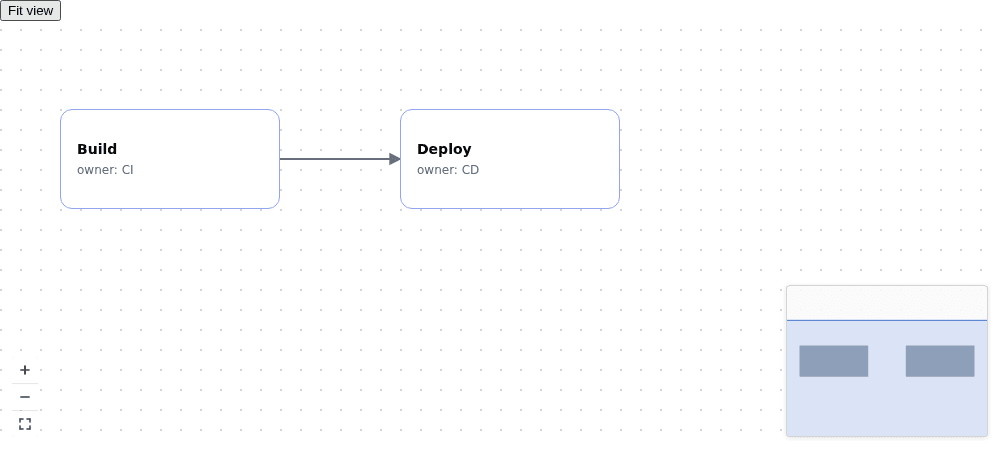
The `style` gives the canvas both a width and a resolved height. The two `job` nodes render through `#node-job`, and the slot receives the node's data, so the canvas shows **Build** and **Deploy** as cards rather than stock rectangles. `v-model:nodes` and `v-model:edges` keep the Vue refs synchronized when the user edits the diagram. `plugins="true"` mounts the shipped minimap, zoom/fit controls, and background grid.
## 3. Use the instance
The `@init` event supplies the live [`DiagramInstance`](https://atloria.dev/p/grafloria-h7YM7amryF/developer/grafloria-renderer-instance-diagraminstance#diagraminstance) after the diagram mounts. The sample stores it and calls `fitView(24)` from the button; the view frames the diagram with 24 units of padding. The same instance exposes the model through `getModel()` and the behavior engine through `getEngine()` when a later feature needs those layers.
Do not call `fitView()` during teardown. The component disposes its instance when Vue unmounts it.
## Where next
- [Create custom nodes](https://atloria.dev/p/grafloria-h7YM7amryF/developer/create-custom-nodes) for slot renderers and node behavior.
- [State, events, and undo](https://atloria.dev/p/grafloria-h7YM7amryF/developer/commands-events-and-undo) for the instance event surface and engine history.
- [Auto-layout a diagram](https://atloria.dev/p/grafloria-h7YM7amryF/developer/auto-layout-a-diagram) for the declarative `layout` prop.
- Open the [Vue demo gallery](https://grafloria.com/vue/) to run the Vue examples.