# Build ER and UML diagrams
Use a diagram kit when your input is a schema or a typed class model: the kit creates the cards, ports, relationship markers, and routing, while the normal diagram binding mounts the result.
## Before you start
Install the package for your binding and the element kit. For plain JavaScript, install the renderer and engine peers too:
```bash
npm install @grafloria/element @grafloria/engine @grafloria/renderer
```
The examples use JavaScript, Angular, Qwik, React, and Vue. Give the host a resolved height; otherwise the canvas has no space to paint. See [Style a diagram](https://atloria.dev/p/grafloria-h7YM7amryF/developer/style-a-diagram) for host sizing.
## Build an entity-relationship diagram
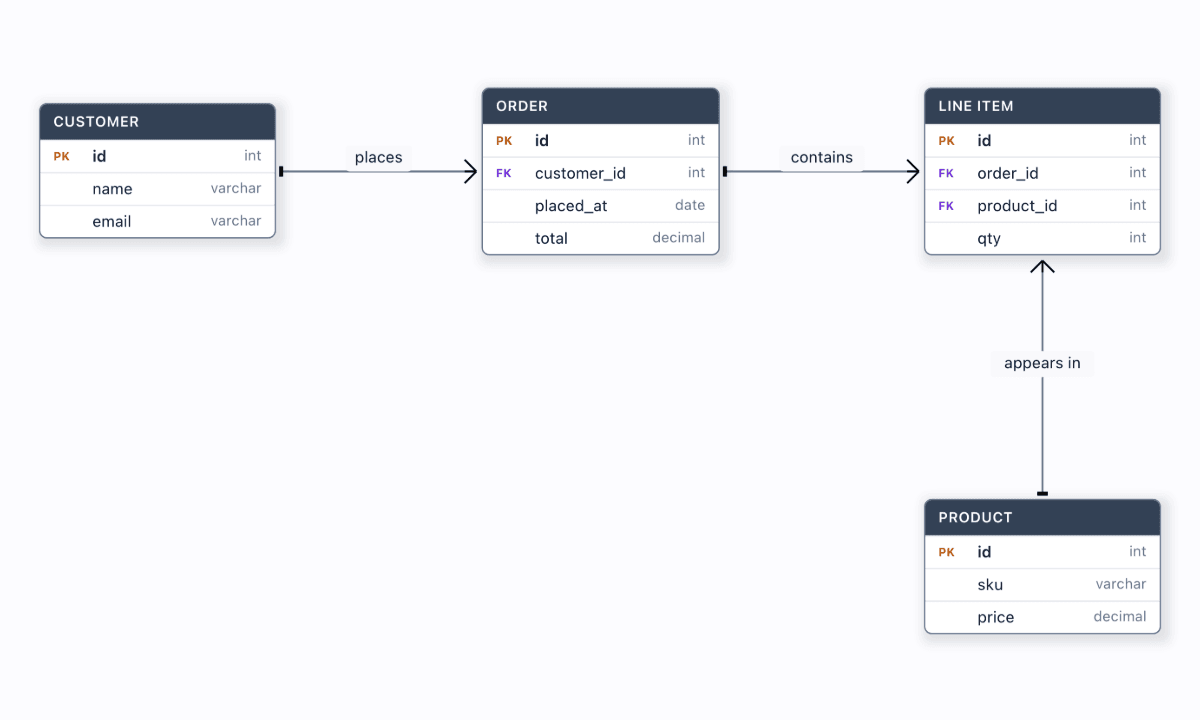
[`erDiagram`](https://atloria.dev/p/grafloria-h7YM7amryF/developer/grafloria-element-diagram-kit-functions#erdiagram) takes `entities` and optional `relationships` and returns a spec for [`render`](https://atloria.dev/p/grafloria-h7YM7amryF/developer/grafloria-element-core#render). Each entity becomes an HTML table card. Its columns show their names and types, and `pk` and `fk` mark keys. Relationships render as orthogonal edges with crow's-foot cardinality.
### JavaScript
Mount the returned spec into a sized element. [`render`](https://atloria.dev/p/grafloria-h7YM7amryF/developer/grafloria-element-core#render) returns the live [`DiagramInstance`](https://atloria.dev/p/grafloria-h7YM7amryF/developer/grafloria-renderer-instance-diagraminstance#diagraminstance); `fitView()` frames the cards after they mount.
```js
import { render, erDiagram } from '@grafloria/element';
const host = document.getElementById('diagram');
if (!host) throw new Error('Missing #diagram');
host.style.height = '600px';
const spec = erDiagram({
entities: [
{ id: 'CUSTOMER', name: 'Customer', position: { x: 60, y: 76 }, columns: [
{ name: 'id', type: 'int', pk: true }, { name: 'email', type: 'varchar' },
] },
{ id: 'ORDER', name: 'Order', position: { x: 400, y: 76 }, columns: [
{ name: 'id', type: 'int', pk: true }, { name: 'customer_id', type: 'int', fk: true },
] },
],
relationships: [{ from: 'CUSTOMER', to: 'ORDER', label: 'places', cardinality: 'one-to-many' }],
});
const instance = render(spec, host);
instance.fitView(40);
```
You see two table cards joined by a labelled one-to-many relationship. Dragging a card moves its rows and reroutes the edge; clicking a column selects that row and emits the kit's `axk:row-select` event.
### Framework bindings
Create the same kit spec in each framework, then pass it to the binding component. The component mounts the spec on a real diagram instance; the host's `100vh` height gives it a drawing area.
:::code-group
```ts title="Angular"
import { Component } from '@angular/core';
import { GrafloriaDiagramComponent } from '@grafloria/angular';
import { erDiagram } from '@grafloria/element';
@Component({
standalone: true,
imports: [GrafloriaDiagramComponent],
template: ``,
})
export class CustomerOrdersComponent {
spec = erDiagram({
entities: [
{ id: 'CUSTOMER', name: 'Customer', position: { x: 60, y: 76 }, columns: [
{ name: 'id', type: 'int', pk: true }, { name: 'email', type: 'varchar' },
] },
{ id: 'ORDER', name: 'Order', position: { x: 400, y: 76 }, columns: [
{ name: 'id', type: 'int', pk: true }, { name: 'customer_id', type: 'int', fk: true },
] },
],
relationships: [{ from: 'CUSTOMER', to: 'ORDER', label: 'places', cardinality: 'one-to-many' }],
});
}
```
```tsx title="Qwik"
import { component$, $ } from '@builder.io/qwik';
import { GrafloriaDiagram, type DiagramInstance } from '@grafloria/qwik';
import { erDiagram } from '@grafloria/element';
const spec = erDiagram({
entities: [
{ id: 'CUSTOMER', name: 'Customer', position: { x: 60, y: 76 }, columns: [
{ name: 'id', type: 'int', pk: true }, { name: 'email', type: 'varchar' },
] },
{ id: 'ORDER', name: 'Order', position: { x: 400, y: 76 }, columns: [
{ name: 'id', type: 'int', pk: true }, { name: 'customer_id', type: 'int', fk: true },
] },
],
relationships: [{ from: 'CUSTOMER', to: 'ORDER', label: 'places', cardinality: 'one-to-many' }],
});
export default component$(() => (
api.fitView(40))} />
));
```
```tsx title="React"
import { GrafloriaDiagram } from '@grafloria/react';
import { erDiagram } from '@grafloria/element';
const spec = erDiagram({
entities: [
{ id: 'CUSTOMER', name: 'Customer', position: { x: 60, y: 76 }, columns: [
{ name: 'id', type: 'int', pk: true }, { name: 'email', type: 'varchar' },
] },
{ id: 'ORDER', name: 'Order', position: { x: 400, y: 76 }, columns: [
{ name: 'id', type: 'int', pk: true }, { name: 'customer_id', type: 'int', fk: true },
] },
],
relationships: [{ from: 'CUSTOMER', to: 'ORDER', label: 'places', cardinality: 'one-to-many' }],
});
export default function CustomerOrders() {
return
;
}
```
```vue title="Vue"
```
:::
The result is the same in every tab: typed table rows, key badges, and a routed relationship. The binding owns mounting; the kit owns the table-card presentation.
## Build a UML class diagram
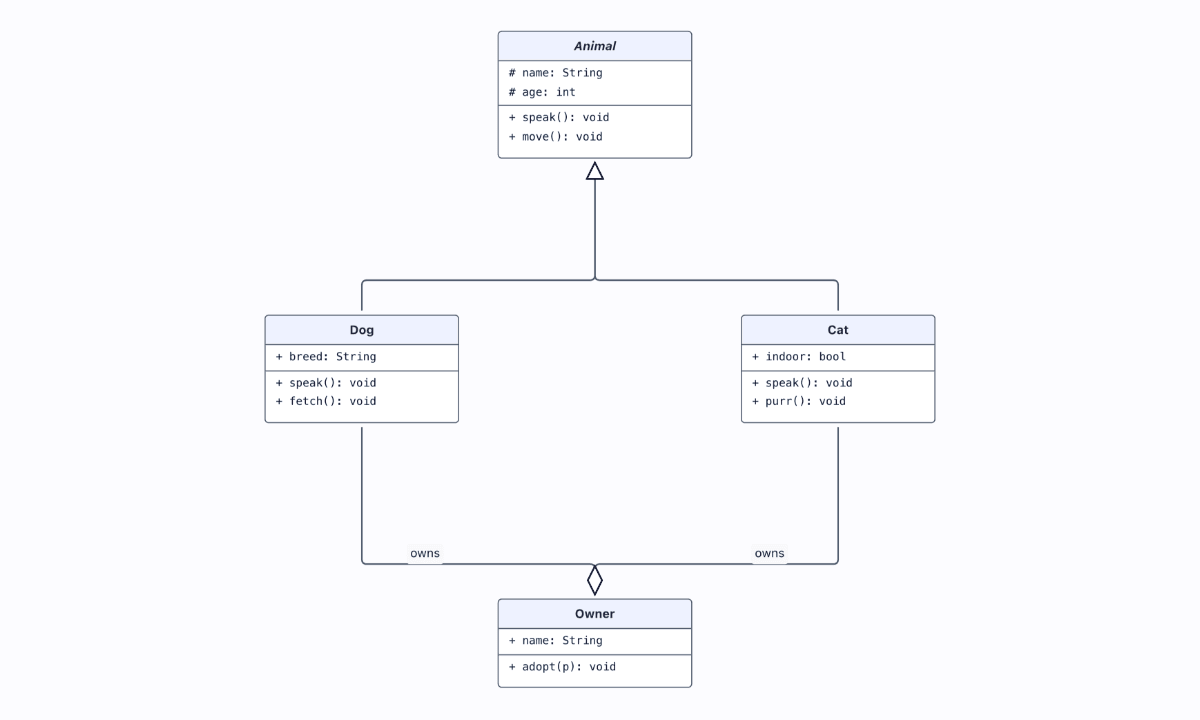
[`umlDiagram`](https://atloria.dev/p/grafloria-h7YM7amryF/developer/grafloria-element-diagram-kit-functions#umldiagram) accepts `classes` and optional `relationships`. Attributes and methods become separate compartments. Relationship `kind` selects UML notation such as `inheritance`, `realization`, `aggregation`, `composition`, and `dependency`; `multiplicity` adds labels at the relationship ends.
```js
import { render, umlDiagram } from '@grafloria/element';
const host = document.getElementById('diagram');
if (!host) throw new Error('Missing #diagram');
host.style.height = '600px';
const spec = umlDiagram({
classes: [
{ id: 'Animal', abstract: true, position: { x: 260, y: 40 }, attributes: ['# name: String'], methods: ['+ speak(): void'] },
{ id: 'Dog', position: { x: 120, y: 280 }, attributes: ['+ breed: String'], methods: ['+ fetch(): void'] },
{ id: 'Owner', position: { x: 420, y: 280 }, attributes: ['+ name: String'], methods: ['+ adopt(p): void'] },
],
relationships: [
{ from: 'Dog', to: 'Animal', kind: 'inheritance' },
{ from: 'Owner', to: 'Dog', kind: 'aggregation', label: 'owns', multiplicity: ['1', '0..*'] },
],
});
const instance = render(spec, host);
spec.finalize(instance);
instance.fitView(40);
```
You see an italic abstract `Animal` class above `Dog` and `Owner`, with attribute and method compartments and UML inheritance and aggregation markers. `render()` runs the UML spec's `finalize()` step automatically; an explicit call is optional and idempotent.
Pass the UML spec to each binding as follows. These samples use a small typed model so each framework mounts a visible class diagram.
:::code-group
```ts title="Angular"
import { Component } from '@angular/core';
import { GrafloriaDiagramComponent } from '@grafloria/angular';
import { umlDiagram } from '@grafloria/element';
@Component({
standalone: true,
imports: [GrafloriaDiagramComponent],
template: ``,
})
export class AnimalComponent {
spec = umlDiagram({
classes: [
{ id: 'Animal', abstract: true, position: { x: 220, y: 40 }, attributes: ['# name: String'], methods: ['+ speak(): void'] },
{ id: 'Dog', position: { x: 220, y: 260 }, attributes: ['+ breed: String'], methods: ['+ fetch(): void'] },
],
relationships: [{ from: 'Dog', to: 'Animal', kind: 'inheritance' }],
});
}
```
```tsx title="Qwik"
import { component$ } from '@builder.io/qwik';
import { GrafloriaDiagram } from '@grafloria/qwik';
import { umlDiagram } from '@grafloria/element';
const spec = umlDiagram({
classes: [
{ id: 'Animal', abstract: true, position: { x: 220, y: 40 }, attributes: ['# name: String'], methods: ['+ speak(): void'] },
{ id: 'Dog', position: { x: 220, y: 260 }, attributes: ['+ breed: String'], methods: ['+ fetch(): void'] },
],
relationships: [{ from: 'Dog', to: 'Animal', kind: 'inheritance' }],
});
export default component$(() =>
);
```
```tsx title="React"
import { GrafloriaDiagram } from '@grafloria/react';
import { umlDiagram } from '@grafloria/element';
const spec = umlDiagram({
classes: [
{ id: 'Animal', abstract: true, position: { x: 220, y: 40 }, attributes: ['# name: String'], methods: ['+ speak(): void'] },
{ id: 'Dog', position: { x: 220, y: 260 }, attributes: ['+ breed: String'], methods: ['+ fetch(): void'] },
],
relationships: [{ from: 'Dog', to: 'Animal', kind: 'inheritance' }],
});
export default function AnimalDiagram() {
return
;
}
```
```vue title="Vue"
```
:::
The bindings mount the returned kit spec and preserve its class compartments and relationship markers.
## Editing and options
Set `editable: true` on either kit when the diagram itself is the editor. In an ER diagram, double-click a table header or column to rename it, use the add-column affordance, or delete a row. Each edit is undoable and field-level relationships remain attached to their columns. `rowSelection` controls whether clicking a row selects it; rows are selectable by default.
| Option | Type | Default | What it does |
| --- | --- | --- | --- |
| `entities` | `ErEntitySpec[]` | required | Declares ER table cards and their columns. |
| `relationships` | `ErRelationshipSpec[]` | — | Declares ER relationships; `TABLE.column` endpoints pin to rows. |
| `classes` | `UmlClassSpec[]` | required | Declares UML class cards, attributes, and methods. |
| `editable` | `boolean` | `false` | Enables in-canvas editing for the kit. |
| `rowSelection` | `boolean` | `true` | Enables column/member row selection. |
If you add a custom-node renderer around these diagrams, its initial render runs at mount, not whenever node data changes. Update the DOM that your renderer owns, or use the dashboard widget update and repaint handles when those are the surface you chose.
## See it running
- [Table / ER diagram](https://grafloria.com/demos/diagrams/table-er.html) shows typed columns, PK/FK badges, crow's-foot relationships, and row selection.
- [Class diagram (UML)](https://grafloria.com/demos/diagrams/class-uml.html) shows class compartments, inheritance, and aggregation.
For the editable ER surface, see [ERD editor](https://grafloria.com/demos/diagrams/erd-editor.html). For the complete UML relationship vocabulary, see [UML relationships](https://grafloria.com/demos/diagrams/uml-relationships.html).
## Related
- [How Grafloria works](https://atloria.dev/p/grafloria-h7YM7amryF/developer/how-grafloria-works) explains the shared model and engine.
- [Commands, events, and undo](https://atloria.dev/p/grafloria-h7YM7amryF/developer/commands-events-and-undo) explains the history behind kit edits.
- [Style a diagram](https://atloria.dev/p/grafloria-h7YM7amryF/developer/style-a-diagram) covers sizing and theming.
- [Export diagrams](https://atloria.dev/p/grafloria-h7YM7amryF/developer/export-diagrams) covers exporting the mounted instance.